Quick Guide
- Why Bother? The Real-World Power of Your CTR
- Breaking Down the Click Through Rate Formula (And Its Limitations)
- What's a "Good" Click Through Rate? (Spoiler: It Depends)
- The Big Levers: What Actually Moves Your Click-Through Rate?
- Advanced Moves: Going Beyond the Basics
- Diagnosing a Low Click Through Rate: A Troubleshooting Checklist
- Wrapping It Up: CTR as a Compass, Not a Destination
Let's be honest. You've probably seen the acronym CTR a thousand times. It's plastered all over your Google Ads dashboard, your email marketing reports, your SEO tools. But have you ever stopped to really think about what click through rate is telling you? I mean, really think about it? It's not just a number. It's a conversation. It's the first handshake between your content and a potential customer. And if that handshake is weak, well, you're not getting the deal.
I remember staring at a 0.5% click through rate on a campaign I'd spent weeks building. It felt personal. All that work, and people were just... scrolling past. That's when I decided to stop just looking at the number and start understanding the story behind it.
So, what's the story your CTR is telling?
The Click Through Rate, in its simplest form, is a percentage. It tells you how many people who saw your thing (an ad, a search result, an email subject line) actually clicked on it. If 100 people see your Google search snippet and 3 people click it, your click-through rate is 3%. Simple math, profound implications.
But here's where most guides stop. They give you the formula and call it a day. That's like giving someone a car without teaching them to drive. We're going to go much, much deeper.
Why Bother? The Real-World Power of Your CTR
Why does this percentage matter so much? It's not just a vanity metric. A healthy click through rate is like a green light for everything else in your funnel.
First, it's a direct signal of relevance. Search engines like Google use CTR as a key quality signal. If your page appears in search results for a query and consistently gets a higher-than-expected click through rate, Google's algorithms think, "Hey, this result seems to satisfy users looking for this." This can positively influence your organic rankings over time. It's not the only factor, but it's a important one in the user experience puzzle. You can read about how Google uses a variety of signals, including implicit feedback like clicks, in their Search Essentials documentation.
For paid ads, the impact is even more direct and immediate. A higher CTR in platforms like Google Ads directly lowers your Cost-Per-Click (CPC). The platform rewards relevant, engaging ads with a better Ad Rank, which means you pay less for a higher position. A low click through rate tells the platform your ad isn't resonating, and it will charge you more for the privilege of showing it. Ouch.
And for email? A low subject line CTR (your open rate) means your message dies before it's even born. No opens, no clicks inside, no conversions. It all starts with that first click.
Breaking Down the Click Through Rate Formula (And Its Limitations)
Okay, let's get the textbook part out of the way. The click through rate formula is:
CTR = (Total Clicks ÷ Total Impressions) x 100
Impressions are the number of times your item was shown. Clicks are, well, clicks. Multiply by 100 to get a percentage.
Seems straightforward, right? But this is where the first layer of confusion sets in. What counts as an impression? For a search result, it's when it loads on someone's screen. For a display ad, it's when it's served, even if it's at the bottom of a page where no one sees it. This is a crucial point—a low click through rate might not mean your offer is bad; it might mean your placement is bad.
And then there's the "click." Is a mis-tap on a mobile device a valuable click? Not really. This is why you always, always need to look at CTR alongside other metrics like bounce rate and conversion rate. A sky-high CTR followed by a 90% bounce rate is a red flag. You might be using clickbait that attracts the wrong crowd.
I once optimized an ad headline purely for clicks—using a super provocative question. The click through rate soared by 150%. I was ecstatic! Until I saw the conversions. They were zero. All that traffic, and not a single sale. The clicks were empty. The lesson? CTR is a means to an end, not the end itself.
What's a "Good" Click Through Rate? (Spoiler: It Depends)
This is the million-dollar question everyone searches for. And the most honest answer is the one you don't want to hear: it depends completely on your industry, platform, and position.
A 2% CTR for a display banner ad might be fantastic. A 2% CTR for a high-intent Google Search ad in a competitive market might be terrible. See the problem with generic benchmarks?
However, we're not going to leave you hanging. Based on aggregated data from various industry sources (like WordStream's annual benchmarks), here's a rough table to give you context, not a target. Please, don't treat this as gospel.
| Platform / Ad Type | Average CTR Range (Approximate) | Notes & Context |
|---|---|---|
| Google Search Ads | 3% - 6% | Varies wildly. Top-of-page ads can see 7-10%. Highly commercial keywords (e.g., "buy iPhone") have lower CTRs than informational ones. |
| Google Display Ads | 0.5% - 1.0% | Much lower intent. A 1%+ CTR here is often considered strong. |
| Facebook Ads | 1% - 3% | Depends on objective (traffic vs. conversion) and audience targeting. |
| Email Marketing (Open Rate) | 15% - 25% | This is your email's "first click." Industry and list health are huge factors. |
| Organic Search Results | Varies by position | Result #1 can get ~30%+ CTR. Result #2 drops to ~15%. By #10, it's often below 2%. |
The real benchmark you should care about is your own. Track your historical click through rate. Is this month's CTR higher or lower than last month's? That's your trend. That's what matters. Aim to beat your own average, not some arbitrary industry number.
The Big Levers: What Actually Moves Your Click-Through Rate?
Now we get to the good stuff. You've diagnosed your CTR. Now, how do you improve it? The factors break down into a few core areas. Let's start with the biggest one for search.
The Holy Trinity of Search CTR: Title, URL, and Meta Description
This is what people see on Google. It's your storefront window.
- The Title Tag (H1): This is your main headline. It must contain the core keyword the searcher used, but it also needs a hook. A promise, a benefit, or a clear answer. "Best Running Shoes" is okay. "Best Running Shoes for Plantar Fasciitis in 2024 [Expert Tested]" is better. It's specific and speaks to a specific pain point.
- The Meta Description: This is your sales pitch in 155-160 characters. Don't just stuff keywords. Write a mini-ad. Use action verbs, hint at a benefit, and include a call to action. "Learn how to...", "Discover the top 5...", "See why X is the best solution for...". Google doesn't always use your meta description, but when it does, make it count.
- The URL: A clean, readable URL that includes the keyword reinforces relevance. `your site.com/best-running-shoes` is better than `your site.com/post?id=12345`.
But here's a personal gripe. Sometimes, even with perfect SEO snippets, your click through rate is low. Why? Because you're ranking on page 2. Or because a competitor has a brand name everyone trusts. Or because they have sitelinks and rich snippets that make their result look ten times more appealing. You can't always win on title alone.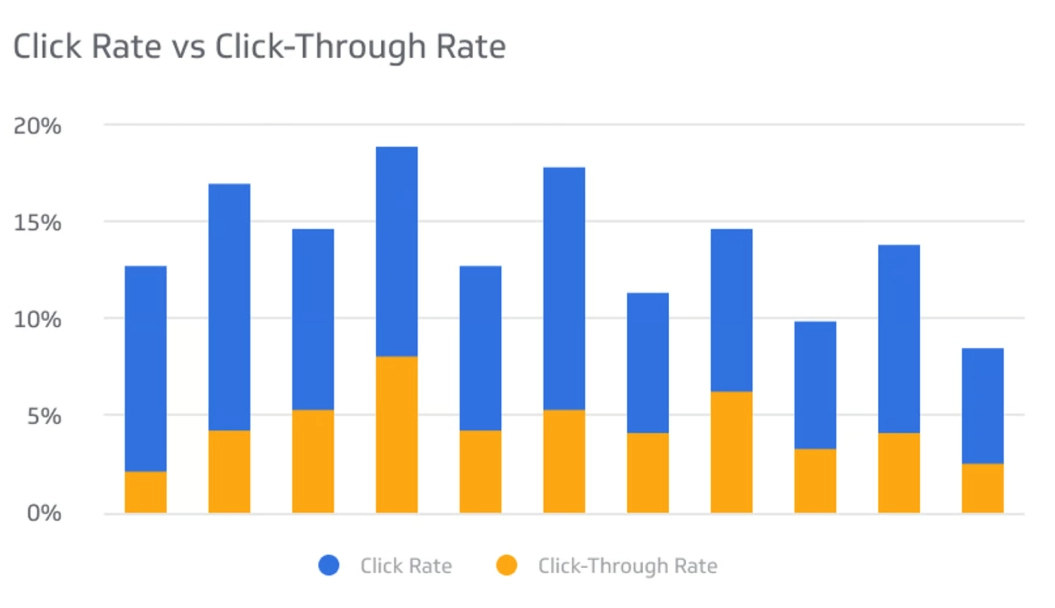
For Ads: It's All About Alignment and Gap
Your ad's click through rate lives or dies by its connection to two things: the search query and the landing page.
- Keyword-Intent Match: Are you showing your ad for the right searches? An ad for "luxury hotel deals" shown to someone searching "cheap motel near me" will have a terrible CTR. The intent is wrong.
- Ad Copy Relevance: Does your headline and description directly speak to that query? Use dynamic keyword insertion (like {KeyWord:Default}) to make it feel personalized.
- The "Gap": This is a psychological trick. Your ad should create a curiosity gap or a promise gap. The searcher has a question, your ad hints at the answer but doesn't give it all away—forcing the click. "The one mistake everyone makes when changing oil" works better than "How to change your oil."
- Extensions, Extensions, Extensions: Site link extensions, call extensions, structured snippets. They make your ad bigger, more informative, and more clickable. They take up more real estate. This is non-negotiable for improving ad CTR.

The Silent Killer: User Experience & Page Speed
This one is subtle but massive. Google has stated that page experience, including Core Web Vitals (loading speed, interactivity, visual stability), is a ranking factor. But it also affects CTR indirectly. How? In two ways.
First, if your page is slow to load in the search results (indicated by things like the "Slow" label Chrome experimented with), users will skip it. They'll click the faster result.
Second, and this is huge for mobile, your page's mobile-friendliness is assessed. A page that isn't mobile-friendly might get a lower click through rate from mobile searchers because the preview looks broken or the text is tiny. Google's Mobile-Friendly Test tool is a free and authoritative resource to check this.
Think about it. You're on your phone. You see two results. One says "This page may not load well on your device" (metaphorically, through a bad preview). Which one do you click? Exactly.
Advanced Moves: Going Beyond the Basics
Once you've nailed the fundamentals, you can play with more advanced tactics to squeeze extra percentage points out of your click through rate.
Schema Markup (Rich Results): This is code you add to your page to help search engines understand your content better. The reward? Your result can be enhanced with stars (review ratings), images, FAQs, how-to steps, or event details. These "rich snippets" stand out. They attract the eye. They often have a significantly higher click through rate than a plain blue link. Implementing schema correctly can be technical, but the payoff is worth it. The definitive guide is on schema.org, the collaborative project by Google, Microsoft, Yahoo, and Yandex.
The "Answer Box" or "Position Zero": This is the featured snippet at the top of Google. You don't just get a link; you get a box with your content excerpted. The CTR for these is complex. Sometimes it's huge because you're at the very top. Sometimes it can be lower because the answer is right there, so users don't need to click (the dreaded "no-click search"). However, the authority boost and brand visibility are usually worth it.
Psychological Triggers in Copy: Numbers ("7 Ways..."), parentheses adding clarification (Like This), urgency ("Limited Time"), and specificity ("For Beginners") all work. They reduce ambiguity and help the user self-select.
A Word of Caution on Clickbait: Don't be the marketer who cries wolf. Yes, "You Won't Believe What Happened Next!" might get a click. Once. But if your page doesn't deliver, your bounce rate will spike, your dwell time will plummet, and Google will get the signal that your page didn't satisfy the query. This can hurt your rankings long-term. It erodes trust. It's a short-term tactic with long-term consequences.
Diagnosing a Low Click Through Rate: A Troubleshooting Checklist
Your CTR is low. Don't panic. Work through this list.
- Check Your Position: Are you on page 2 or beyond? A low CTR is normal. Focus on ranking higher.
- Analyze the SERP: Look at the actual search results for your keyword. Who's above you? Do they have rich snippets, massive brand authority, or better titles? Your competition defines what "good" is.
- Review Your Snippet: Is your title compelling? Is your meta description a coherent, benefit-driven sentence? Does your URL look clean?
- Intent Mismatch: Are you ranking for a keyword where your page isn't the best answer? Maybe your page is a broad guide, but the keyword is a specific "how-to." This is a common SEO issue.
- Technical Issues: Run your page through Google's tools. Is it mobile-friendly? Is it slow? Does it have intrusive interstitials (pop-ups) that might deter clicks from the preview?
- Brand Awareness: If you're a new brand competing against household names, your CTR will be lower. This is a long-term battle won with consistent quality and exposure.
Wrapping It Up: CTR as a Compass, Not a Destination
We've covered a lot of ground. From the basic click through rate formula to the psychological levers and technical underpinnings that affect it. The key takeaway is this: CTR is a diagnostic metric, not a goal in itself.
Don't obsess over hitting some arbitrary benchmark. Obsess over understanding why your number is what it is. Is your message clear? Is your targeting accurate? Does your search snippet promise what your page delivers?
Improving your click through rate is a process of continuous refinement. Test different title tags. Experiment with ad copy. Implement schema. Speed up your site. Each of these actions sends a clearer signal to both users and algorithms about what you offer.
That campaign I mentioned at the start, the one with the 0.5% CTR? By focusing on intent alignment, rewriting the ad copy to address a specific fear, and adding compelling sitelink extensions, I got it to a consistent 4.2%. The traffic became qualified. The conversions followed. It wasn't magic. It was just listening to what the click through rate was trying to say all along.
Start that conversation with your metrics today. Ask your CTR what's wrong. Then listen closely.
Reader Comments